Visual Studio to Arduino
Project - Sep 28, 2015 Migrated from Tumblr

Here I have a signal going from Visual Studio to an Arduino using an Ateml programmer.
<iframe width="560" height="315" src="
title="YouTube video player" frameborder="0" allow="accelerometer; autoplay; clipboard-write; encrypted-media; gyroscope; picture-in-picture; web-share" allowfullscreen></iframe>
I just wanted a basic setup ready to go so I could jump in and use it anytime I wanted. Here’s the GITHUB repository.
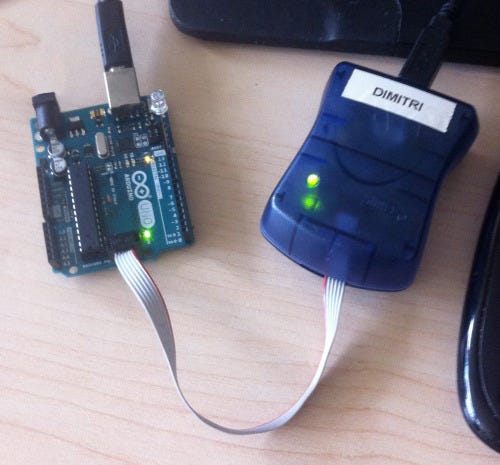
Here is the physical setup we’re going to be looking for, and a few things to be aware of.
Startup Settings
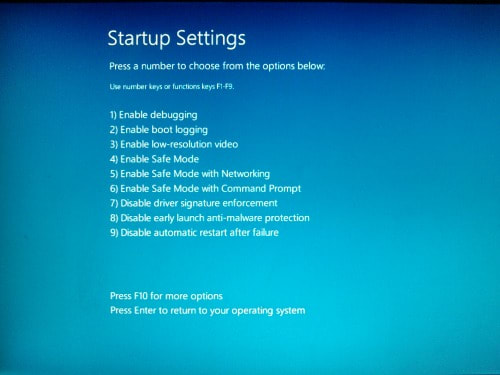
The computer needs to be reset with Disable driver signature enforcement. Reset your computer with shift held down. Go to Startup Settings, and type ‘7′
Connect the Programmer and the Arduino with cables to your computer.
The programmer needs to be connected so it can upload the program, and the Arduino needs to be connected so it can receive data.
The Anode (long pin) of the LED needs to be in pin 12, not 13.
Pin 13 shares functionality with some of the internal mechanisms of the board.
Once you use a programmer with your board, it is now flashed and needs a programmer in order to upload.
I didn’t realize that before, and when I tried to go back to normal serial communication it caused a lot of frustration.
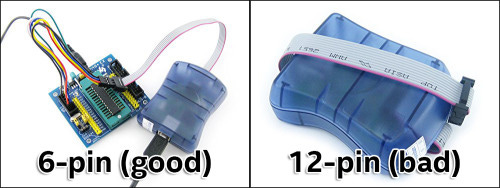
You need a 6 pin Ateml programmer, not a 12 pin